Troubleshooting
Few things can go wrong set-up or data acquisition. Here are a couple of common problems
I started the acquisition and would like to cancel it
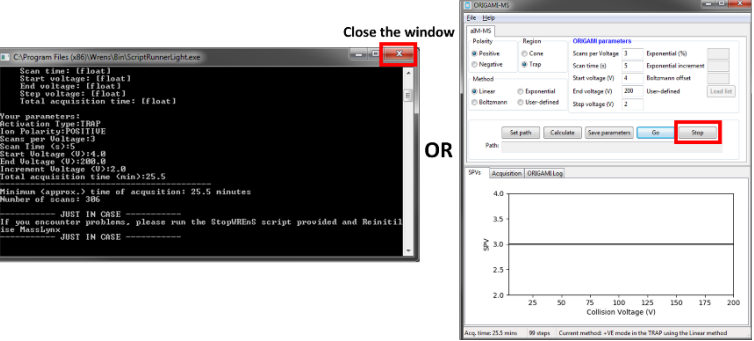
- Press the
Stopbutton in the GUI or close theCommand Promptwindow that opened when you clickedGo - Check that WREnS code is not running in the background. To do this, open new command prompt (Start -> type in telnet epc). Wait for the ticker to change. It should say something like
Wrens-DATAorNot running Wrens-Dataor should say nothing. If you see a lot of text being updated, relatively frequently, then ORIGAMI-MS might still be running in the background. - If you think something is still running, open WREnS directory (typically:
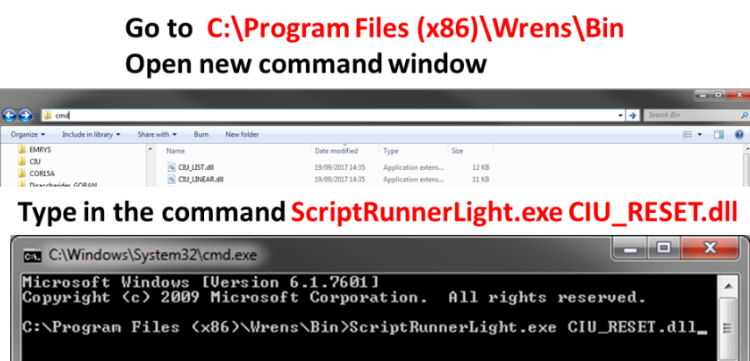
C:\Program Files (x86)\Wrens\Bin, open new command prompt window from within the address tab and execute the following commandScriptRunnerLight.exe CIU_RESET.dll. - Stop the acquisition in MassLynx
- In the same window, reinitilize MassLynx (Acquire -> Reinitilize)

I typed in all parameters but I get the message: "Are you sure you filled in correct details or pressed calculate"
- Check what ORIGAMI log tells you
- Make sure you typed in correct values
- Make sure you pressed on the
Calculatebutton - Check the status bar to see whether your code was computed
I have filled in all parameters and no message window appear, just a quick flash of something (maybe command window)
There couple be a couple of reasons for this
- WREnS cannot find your script. Gave you put the .dll script in
‘C:\Program Files (x86)\Wrens\Bin? - WREnS cannot read your script. Have you tried compiling each .dll script yourself? See how to do it by going to the compilation tutorial
I have filled in all parameters correctly, I see a windoe appear but my molecule is not being activated
One of the reason why ORIGAMI-MS might not be working is that WREnS was not installed correctly on your machine. Make sure during the installation to indicate that you are installing WREnS on PC with instrument and select the correct SCN number. If the SCN number does not match your MassLynx installation, it probably means that WREnS cannot communicate with the EPC on your instrument.